Phenology describes seasonal change in vegetation condition. In this activity, you will use Sentinel-2 NDVI in Google Earth Engine to explore how forest greenness changes through the year.
The focus is on pixel-level time series. This helps show that different pixels can have different seasonal patterns, even within the same region of interest.
Learning objectives
By the end of this activity, you should be able to:
load Sentinel-2 Surface Reflectance data in Google Earth Engine (GEE)
mask clouds using the Scene Classification Layer (SCL)
calculate NDVI
create monthly NDVI composites
display monthly NDVI maps
click a pixel and inspect its seasonal NDVI curve
compare pixel-level and ROI-level phenology
Concept
The Normalized Difference Vegetation Index, or NDVI, is a vegetation greenness index.
NDVI = (NIR - Red) / (NIR + Red)High NDVI usually indicates green vegetation. Low NDVI may indicate water, bare soil, roads, shadows, sparse vegetation, senescent vegetation, or disturbance.
NDVI changes through the year as leaves emerge, canopies develop, vegetation reaches peak greenness, and senescence begins. Different land-cover types can have different seasonal curves. For example, deciduous forest, conifer forest, wetland, water, and disturbed areas may all show different NDVI patterns.
In this activity, we first inspect NDVI at individual pixels. Then we compare that local signal with the mean NDVI curve for the whole ROI.
Complete GEE script
Copy the script below into the GEE Code Editor.

// ------------------------------------------------------------
// Pixel-level phenology using Sentinel-2 NDVI
// Forêt Duparquet ROI
// ------------------------------------------------------------

// 1. Choose the year
var year = 2023;

// 2. Define the region of interest
var roi = ee.Geometry.Polygon([
  [
    [-79.50241092370698, 48.3829536766289],
    [-79.1741943709726, 48.3829536766289],
    [-79.1741943709726, 48.53958791639697],
    [-79.50241092370698, 48.53958791639697],
    [-79.50241092370698, 48.3829536766289]
  ]
]);

var startDate = ee.Date.fromYMD(year, 1, 1);
var endDate = ee.Date.fromYMD(year, 12, 31);
var months = ee.List.sequence(1, 12);

// 3. Cloud mask using the Sentinel-2 Scene Classification Layer
function maskS2(image) {
  var scl = image.select("SCL");

  var mask = scl.neq(3)    // cloud shadow
    .and(scl.neq(6))      // water
    .and(scl.neq(8))       // medium probability cloud
    .and(scl.neq(9))       // high probability cloud
    .and(scl.neq(10))      // cirrus
    .and(scl.neq(11));     // snow or ice

  return image
    .updateMask(mask)
    .divide(10000)
    .copyProperties(image, ["system:time_start"]);
}

// 4. Load Sentinel-2 and calculate NDVI
var s2 = ee.ImageCollection("COPERNICUS/S2_SR_HARMONIZED")
  .filterBounds(roi)
  .filterDate(startDate, endDate)
  .filter(ee.Filter.lt("CLOUDY_PIXEL_PERCENTAGE", 70))
  .map(maskS2)
  .map(function(image) {
    var ndvi = image.normalizedDifference(["B8", "B4"]).rename("NDVI");
    return image.addBands(ndvi);
  });

print("Number of Sentinel-2 images:", s2.size());

// 5. Create monthly NDVI composites
var monthlyNDVI = ee.ImageCollection.fromImages(
  months.map(function(m) {
    m = ee.Number(m);

    var img = s2
      .filter(ee.Filter.calendarRange(m, m, "month"))
      .select("NDVI")
      .median()
      .clip(roi);

    return img
      .set("month", m)
      .set("system:time_start", ee.Date.fromYMD(year, m, 15).millis());
  })
);

print("Monthly NDVI collection:", monthlyNDVI);

// 6. Display monthly NDVI maps
var ndviVis = {
  min: 0,
  max: 1,
  palette: ["white", "yellow", "green", "darkgreen"]
};

Map.centerObject(roi, 11);
Map.addLayer(roi, {color: "red"}, "ROI", false);

months.getInfo().forEach(function(m) {
  var img = ee.Image(
    monthlyNDVI.filter(ee.Filter.eq("month", m)).first()
  );

  Map.addLayer(img, ndviVis, "NDVI month " + m, false);
});

// 7. Click a pixel to display its monthly NDVI curve
var panel = ui.Panel({
  style: {
    width: "420px",
    position: "top-right"
  }
});

panel.add(ui.Label("Click a pixel inside the ROI to see monthly NDVI"));
ui.root.add(panel);

var selectedPointLayer;

Map.onClick(function(coords) {
  panel.clear();

  var point = ee.Geometry.Point([coords.lon, coords.lat]);

  panel.add(ui.Label(
    "Pixel: " +
    coords.lon.toFixed(5) + ", " +
    coords.lat.toFixed(5)
  ));

  var pixelChart = ui.Chart.image.series({
    imageCollection: monthlyNDVI,
    region: point,
    reducer: ee.Reducer.first(),
    scale: 10,
    xProperty: "system:time_start"
  }).setOptions({
    title: "Monthly NDVI at selected pixel, " + year,
    hAxis: {title: "Month"},
    vAxis: {
      title: "NDVI",
      viewWindow: {min: 0, max: 1}
    },
    lineWidth: 2,
    pointSize: 4
  });

  panel.add(pixelChart);

  if (selectedPointLayer) {
    Map.layers().remove(selectedPointLayer);
  }

  selectedPointLayer = ui.Map.Layer(
    point,
    {color: "blue"},
    "Selected pixel"
  );

  Map.layers().add(selectedPointLayer);
});

// 8. Create a whole-ROI mean NDVI curve
var roiChart = ui.Chart.image.series({
  imageCollection: monthlyNDVI,
  region: roi,
  reducer: ee.Reducer.mean(),
  scale: 10,
  xProperty: "system:time_start"
}).setOptions({
  title: "Mean monthly NDVI for whole ROI, " + year,
  hAxis: {title: "Month"},
  vAxis: {
    title: "Mean NDVI",
    viewWindow: {min: 0, max: 1}
  },
  lineWidth: 2,
  pointSize: 4
});

print(roiChart);
Script explanation
Set the year and ROI
var year = 2023;
var roi = ee.Geometry.Polygon([...]);
The year controls the analysis period. The ROI limits the image filtering, map display, charts, and summaries.
Load Sentinel-2
var s2 = ee.ImageCollection("COPERNICUS/S2_SR_HARMONIZED")This loads Sentinel-2 Surface Reflectance imagery from the Earth Engine Data Catalog.
Sentinel-2 provides 10 m visible and near-infrared bands, which makes it useful for vegetation monitoring and pixel-level phenology.
Mask clouds
function maskS2(image) {
  var scl = image.select("SCL");
  ...
}
The SCL band is the Sentinel-2 Scene Classification Layer. It identifies clouds, cloud shadows, cirrus, snow, vegetation, bare soil, water, and other surface classes.
This script removes cloud shadow, water, medium probability cloud, high probability cloud, cirrus, and snow or ice pixels. Cloud masking is essential because cloudy pixels can create false drops or spikes in NDVI.
Scale reflectance values
.divide(10000)Sentinel-2 Surface Reflectance values are stored as scaled integers. Dividing by 10,000 converts them to reflectance values that are easier to interpret.
Calculate NDVI
var ndvi = image.normalizedDifference(["B8", "B4"]).rename("NDVI");For Sentinel-2:
B8is near-infraredB4is red
Green vegetation usually reflects strongly in the near-infrared and absorbs strongly in the red, which produces high NDVI values.
Create monthly composites
var monthlyNDVI = ee.ImageCollection.fromImages(
  months.map(function(m) {
    ...
  })
);
This creates one median NDVI image for each month. Monthly median composites reduce the influence of clouds, shadows, and unusual single-date observations.
Assign a timestamp
.set("system:time_start", ee.Date.fromYMD(year, m, 15).millis())This assigns each monthly composite to the middle of the month. Earth Engine uses system:time_start to place each image correctly on the x-axis of a time series chart.
Display monthly maps
months.getInfo().forEach(function(m) {
  Map.addLayer(img, ndviVis, "NDVI month " + m, false);
});
This adds one NDVI layer per month. The layers are turned off by default to avoid cluttering the map. You can turn them on one by one in the Layers panel.
Click a pixel
Map.onClick(function(coords) {
  ...
});
When you click the map, the script extracts the NDVI value at that pixel for each monthly composite and displays a time series chart.
This is the core of the activity. It lets you compare seasonal NDVI patterns for different pixels.
Compare with the ROI mean
var roiChart = ui.Chart.image.series({
  imageCollection: monthlyNDVI,
  region: roi,
  reducer: ee.Reducer.mean(),
  scale: 10
});
This chart calculates the mean NDVI across all valid pixels in the ROI for each month.
The ROI mean is useful as a summary, but it can hide local variation. A mixed landscape with forest, wetlands, water, roads, and disturbed areas may have a mean curve that does not represent any single pixel well.
Expected outputs
After running the script, you should see:
the ROI boundary on the map
one monthly NDVI layer for each month
a panel that asks you to click a pixel
a pixel-level NDVI curve after clicking the map
a whole-ROI mean NDVI chart in the Console
Result example
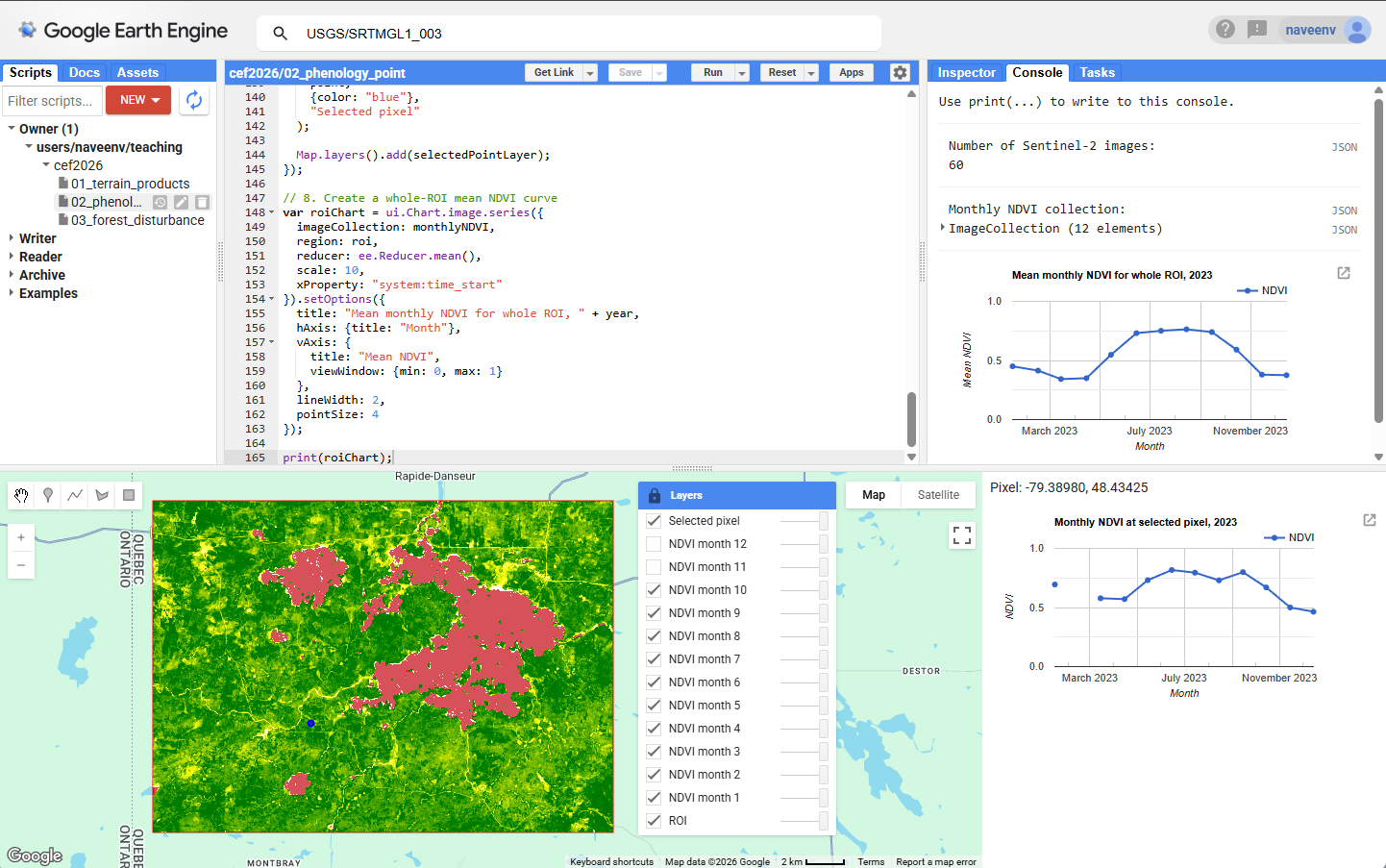
Monthly Sentinel-2 NDVI layers and a pixel-level NDVI time series for the rectangular study area around Forêt Duparquet.
Interpretation notes
High NDVI values usually indicate green, photosynthetically active vegetation.
Low NDVI values may indicate water, bare soil, roads, shadows, sparse vegetation, disturbed areas, or senescent vegetation.
A deciduous forest pixel may show a strong seasonal curve, with low NDVI early in the year, high NDVI during summer, and lower NDVI again in autumn.
A coniferous forest pixel may show a weaker seasonal curve because foliage remains present throughout the year.
A water pixel usually has low NDVI and may show noisy or unstable values.
The ROI mean NDVI curve summarizes the whole area, but it can hide important pixel-level differences.
Questions
Click a dense forest pixel. What does its NDVI curve look like?
Click a wetland, water, or open pixel. How does the curve differ?
Which month has the highest NDVI?
Which pixels show strong or weak seasonal variation?
Is the whole-ROI mean curve representative of all pixels?
Answers
A dense forest pixel usually has high NDVI during the growing season, with a spring increase, summer peak, and autumn decline.
Wetland, water, or open pixels usually have lower NDVI than dense forest. Wetlands may vary seasonally, while water pixels are usually low or noisy.
The highest NDVI is usually during the main growing season, often July or August in this region, but the exact month can vary by pixel and year.
Deciduous vegetation often shows strong seasonal variation. Coniferous forest, water, roads, bare ground, or shaded pixels may show weaker variation.
Not always. The ROI mean combines many land-cover types and can hide local differences.
Optional extension
Try changing the year.
var year = 2022;Then rerun the script and compare the pixel-level curves.
You can also compare different pixel types, such as closed forest, wetland, water, road, and recently disturbed areas.